The time tracker
built for Windows.

Native Windows app with system tray integration, automatic app tracking, optional screenshots, and full offline support. Works on Windows 10 and 11.

Download for Windows

Features

Built for the way
Windows users work.

From the system tray to Office 365, TimeMizwo fits into your existing Windows workflow without friction.

System Tray Integration

Track time from the Windows system tray, always accessible.

TimeMizwo sits in your Windows system tray so it’s always one right-click away. Start and stop timers, switch projects, and check today’s total without breaking your workflow.
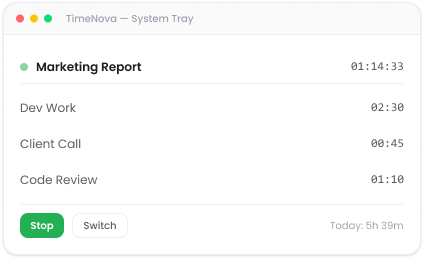
TimeMizwo timer controls in the Windows system tray
App & URL Tracking

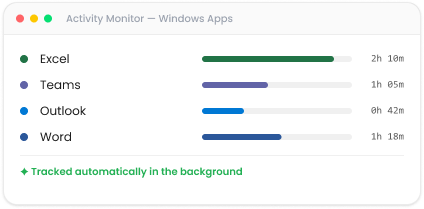
See exactly where Windows app time goes, automatically.

TimeMizwo monitors which apps and websites you’re using throughout the day. Review the activity timeline at end of day and log hours in seconds no manual input needed.

TimeMizwo Windows app activity tracking summary

System Requirements

What you need to run TimeMizwo for Windows

Windows Version
Windows 10 (64-bit) or Windows 11
Processor
x64 processor, 1 GHz or faster
Memory
4 GB RAM minimum
Storage
150 MB free disk space

Integrations

Fits Into The Tools YouAlready Use.

TimeMizwo connects with the project management, invoicing, and communication tools your team already relies on no workflow disruption.

Asana logo
ClickUp logo
Jira logo
Trello logo
GitHub logo
Linear logo
Slack logo

FAQ

Download questions

Still Deciding? Try it Free for 7 days.

No credit card. No setup fees. Just clarity on where your time goes.